

Greenleaf Browser

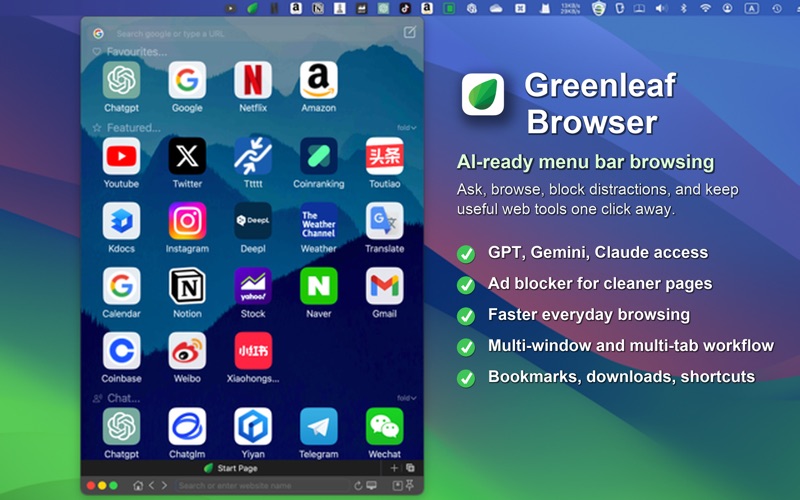
Read our comprehensive review of Greenleaf Browser for Mac. Discover how this AI-friendly productivity browser optimizes multitasking and workspace efficiency.
The Challenge of Modern Multitasking on macOS
For many Mac users, the daily workflow has become a fragmented puzzle. We constantly bounce between traditional search engines, static web resources, and a growing suite of artificial intelligence tools like ChatGPT, Claude, and Gemini. Standard web browsers often struggle to keep up with this dynamic, leaving us buried under a mountain of open tabs and disjointed windows. The Greenleaf Browser Mac productivity tool addresses this exact friction point, offering a fluid, workspace-centric environment designed specifically for macOS users who need to keep their artificial intelligence tools and research side-by-side.
How the Greenleaf Browser Mac Productivity Tool Optimizes Your Workflow
Rather than treating web browsing as a passive viewing experience, this application restructures your screen real estate for active production. By integrating advanced window management directly into the browsing experience, it changes how you interact with web applications and AI assistants alike.
Native-Feeling AI Integration
Instead of keeping AI platforms in isolated browser tabs, this browser allows you to query search engines and top-tier artificial intelligence models directly from your active workspace. You can seamlessly transition between standard search results and conversational interfaces, keeping your reference materials and AI-generated drafts in perfect alignment.
Advanced Window and Tab Flexibility
To prevent desktop clutter, the application introduces highly versatile window behaviors:
- Menu Bar Access: Instantly summon or dismiss quick browser windows directly from the macOS menu bar without disrupting your primary workspace.
- Slide-Trigger & Pinning: Keep critical reference pages pinned to your screen, or set auxiliary windows to slide away and auto-hide when they lose focus.
- Side-by-Side Split Views: Compare documents, cross-reference data, or run parallel research streams side-by-side without manually resizing multiple browser windows.
A Cleaner, Distraction-Free Environment
Beyond layout flexibility, the application features built-in ad blocking to clean up cluttered web pages, improving load times and visual clarity. Combined with a dedicated Dark Reader Mode for low-light comfort and customizable keyboard shortcuts for rapid navigation, the interface is built to keep you in a state of deep focus.
Who Is This Specialized Browser For?
This software is tailored specifically for macOS power users, researchers, writers, and developers who rely heavily on AI tools throughout their workday. If you find yourself constantly resizing browser windows or losing track of your active AI chats amidst dozens of open tabs, the structured workspace provided by this application offers a highly organized alternative.
Final Verdict
By reimagining how windows behave on macOS, this software successfully bridges the gap between traditional web browsing and modern, AI-assisted workflows. To experience this tailored workspace firsthand, you can find the application available on the official Mac App Store.